
![[Performance JMeter] Bài 7 - Functional Helper](/uploads/course/performance_testing_with_jmeter_and_grafana_monitor.png)
NỘI DUNG BÀI HỌC
✅ Cú pháp
✅ Random number
✅ Random string
✅ Choose random
✅ Time
✅ Time shift
✅ Random date
✅ Property Function
✅ Counter
✅ ThreadNum
✅ MachineName
✅ Base64Encode
✅ Base64Decode
✅ MD5
✅ Groovy script
✅ StringToFile
1. Giới thiệu
Ví dụ thực tế: "Khi mọi người viết test script trong JMeter, có hay gặp việc phải xử lý logic lặp đi lặp lại không? Ví dụ: sinh dữ liệu ngẫu nhiên, mã hóa password, parse JSON, convert timestamp…"
-
Functional Helper trong JMeter chính là tập hợp các hàm (functions/groovy utils) được viết sẵn, có thể gọi nhanh trong test plan.
- Cú pháp:
${__MyCustomFunc(param)}lưu ý với cú pháp gọi biến ${variable}
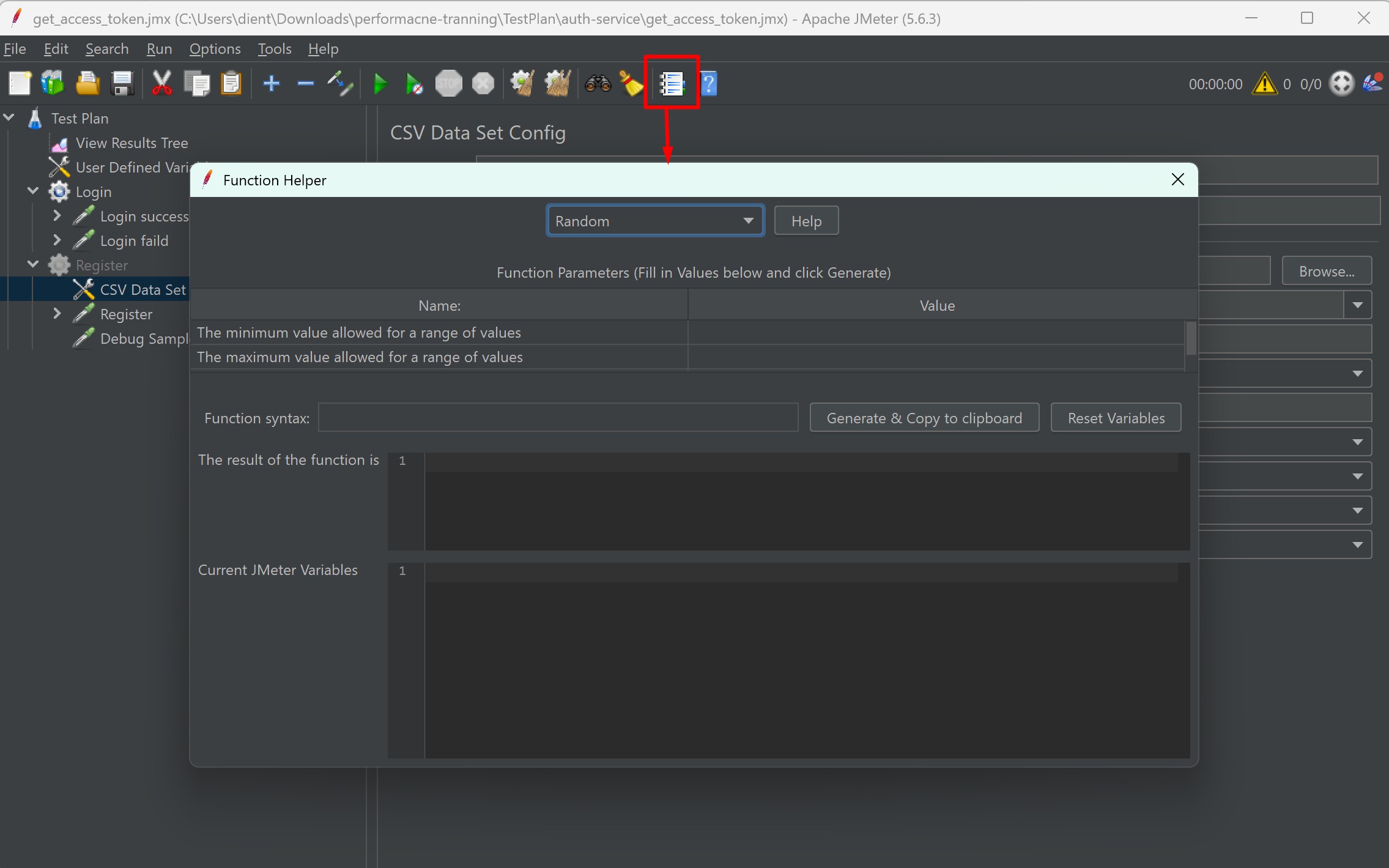
Lưu ý: Một số function (ví dụ base64/MD5/chooseRandom) là plugin — nếu không thấy trong Function Helper bạn cần cài “Custom JMeter Functions” qua Plugin Manager. jmeter-plugins.org+1
2. Tổng hợp các function hay sử dụng
2.1 Sinh số ngẫu nhiên
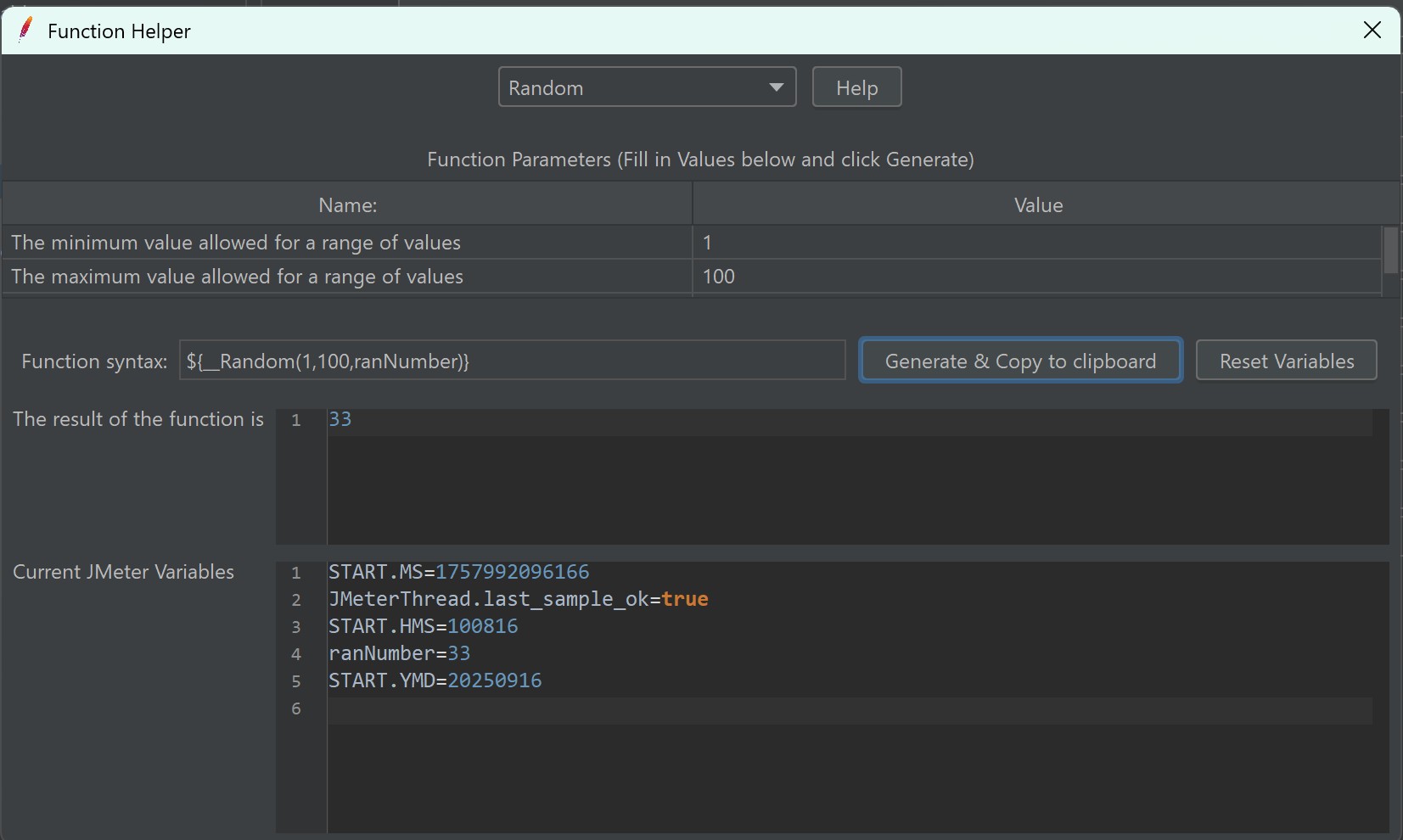
- Cú pháp: ${__Random(min,max,varName)}
- Cách hoạt động: Trả về số trong khoảng [min,max] hoặc chuỗi theo ký tự cho trước. Kết quả có thể gán vào biến nếu đưa varName. (Nhiều tài liệu mô tả cách dùng này — xem tổng quan hàm trong tài liệu JMeter). jmeter.apache.org
- Ví dụ: ${__Random(1000,9999,randId)} -> tạo số 4 chữ số, lưu ${randId}
2.2 Sinh chuỗi ngẫu nhiên
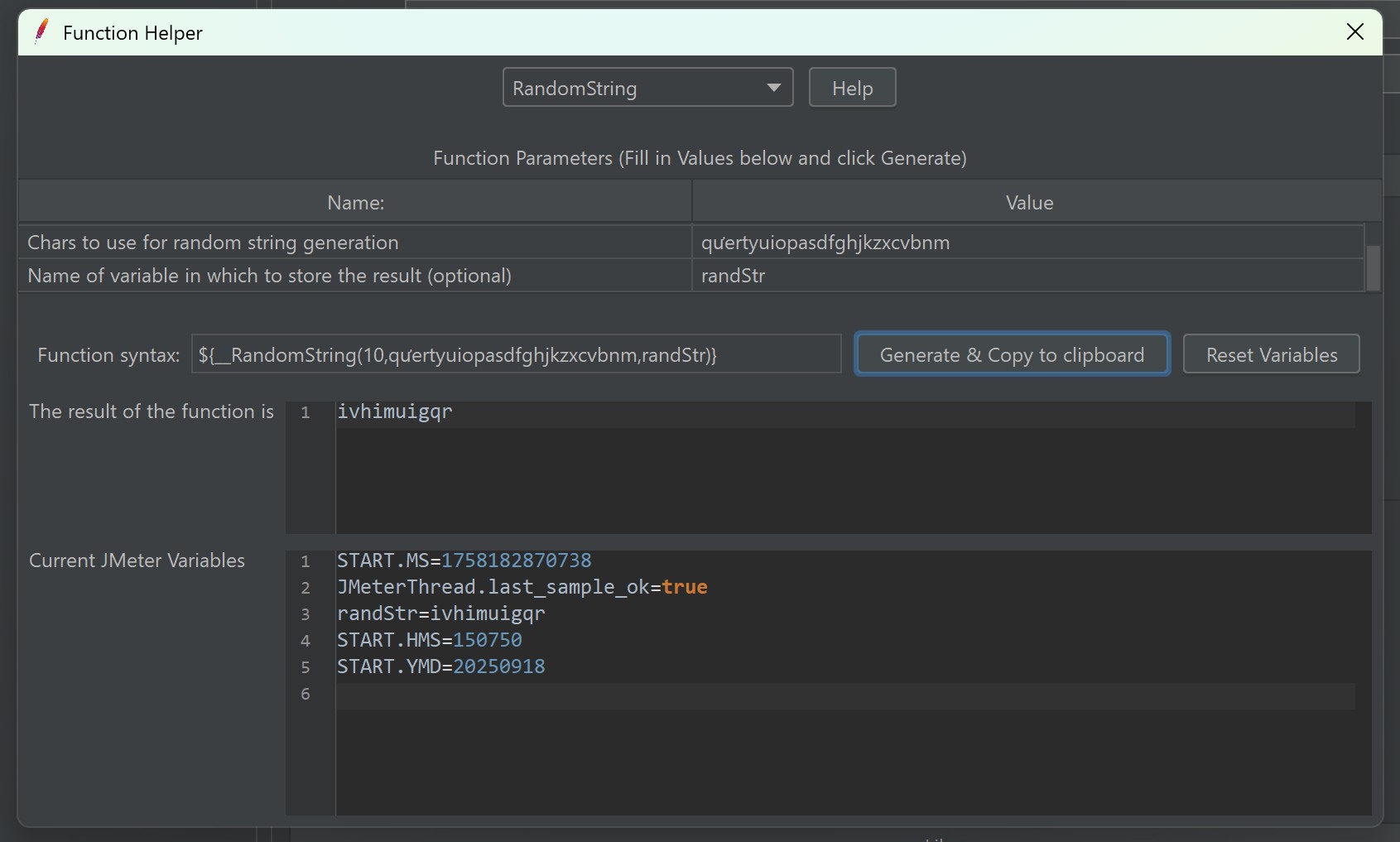
- Cú pháp: ${__RandomString(length,
characters,varName)} - Cách hoạt động: Trả về một chuỗi ngẫu nhiên với độ dài =
length, mỗi ký tự được chọn từ tậpcharactersKết quả có thể gán vào biến nếu đưa varName. (Nhiều tài liệu mô tả cách dùng này — xem tổng quan hàm trong tài liệu JMeter). jmeter.apache.org - Ví dụ: ${__RandomString(10,qưertyuiopasdfghjkzxcvbnm,randStr)} -> tạo chuỗi 10 kí tự, lưu ${randStr}
2.3 Chọn chuỗi ngẫu nhiên từ List
Note: jpgc - Standard Set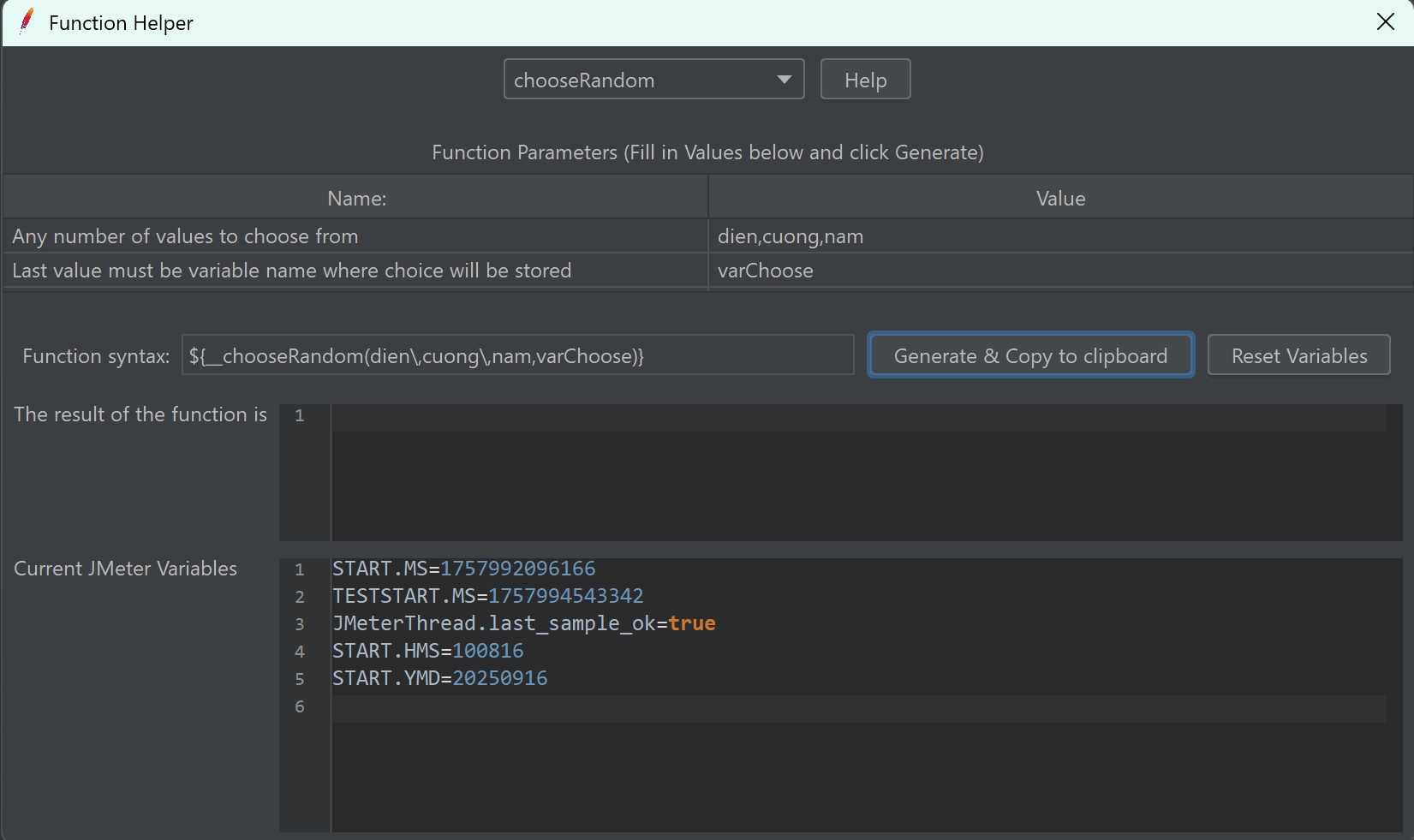
- Cú pháp: ${__chooseRandom(string_1,String_2,String_3,varName)}
- Cách hoạt động: Hàm này là một plugin function (JMeter-Plugins). Nó nhận N giá trị rồi biến cuối là tên biến lưu kết quả. Lưu ý parameter cuối không tham gia vào phép chọn, nó là tên biến nhận kết quả. jmeter-plugins.org+1
- Ví dụ: ${__chooseRandom(blue,red,green,chooseColor)}
-> Chọn một màu trong danh sách, lưu ${chooseColor}
2.4 Time
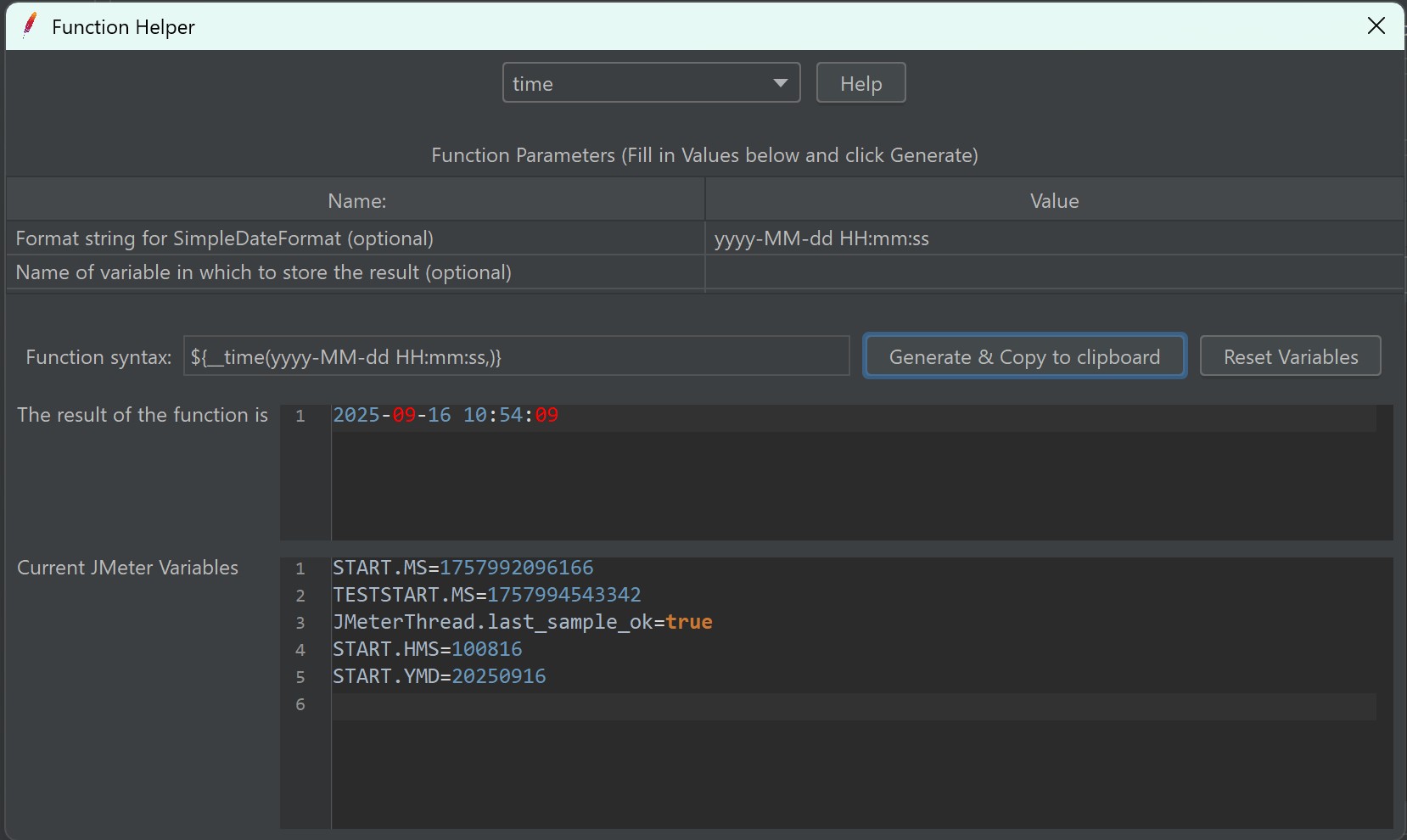
- Cú pháp: ${__time(format,varName)}
- Cách hoạt động: Trả về thời gian hiện tại theo format (theo DateTimeFormatter của Java). Nếu không truyền format → epoch millis(timestamp). jmeter.apache.org+1
- Ví dụ: ${__time(yyyy-MM-dd HH:mm:ss,tNow)}
-> 2025-09-18 15:29:10
2.5 TimeShift
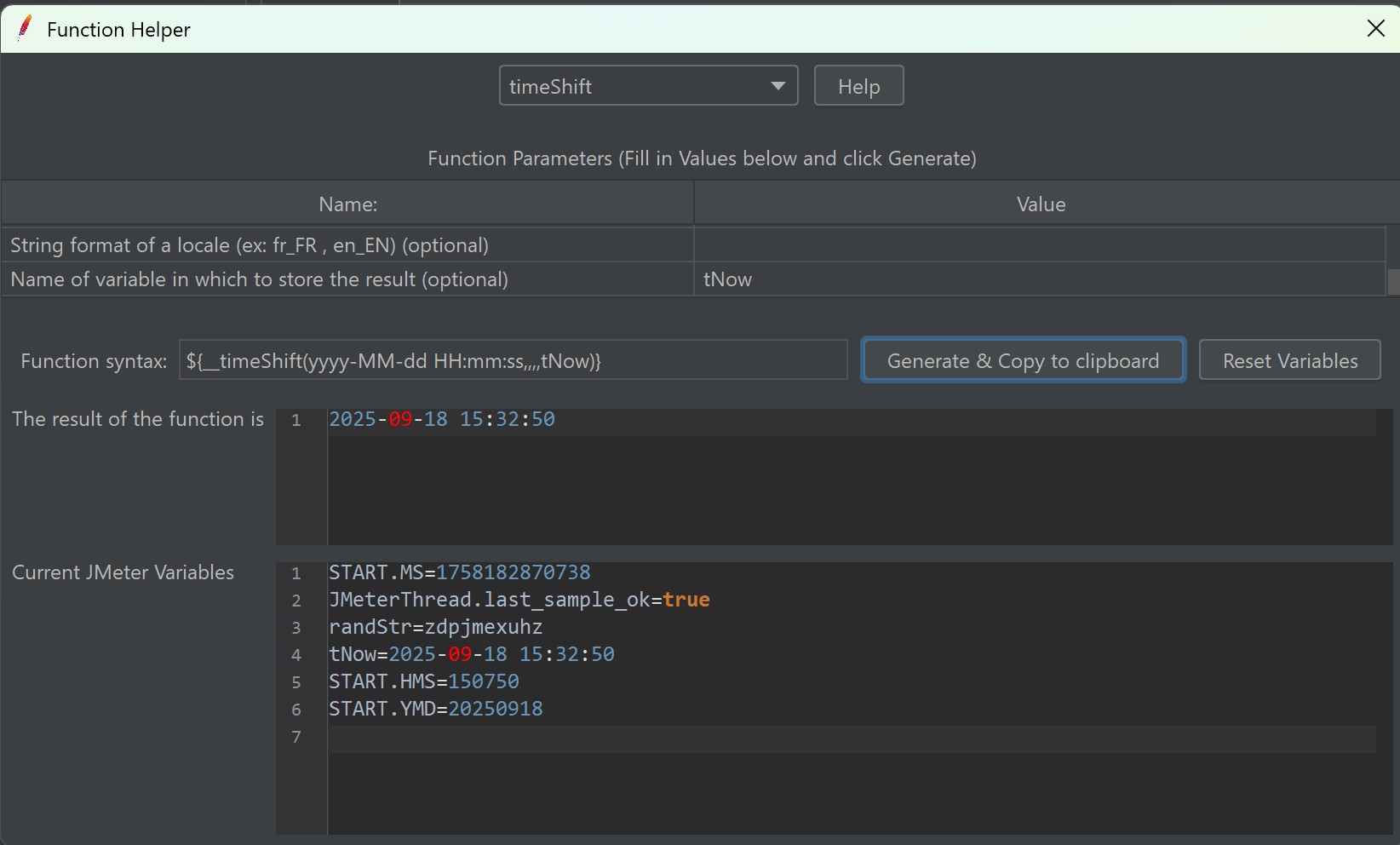
- Cú pháp: ${__timeShift(format,date,shift,locale,varName)
- Cách hoạt động: Trả về thời gian được dịch chuyển lên/xuống theo ISO-8601 style (ví dụ PT15M = 15 phút, P2D = 2 ngày). Trả về giá trị theo format; có thể truyền ngày gốc để dịch từ đó. jmeter.apache.org+1
- Ví dụ:
Mục đích Cú pháp Output (ví dụ) Biến lưu Lấy thời gian hiện tại ${__timeShift(yyyy-MM-dd HH:mm:ss,,,,now)}2025-09-16 10:20:35${now}Ngày mai ${__timeShift(dd/MM/yyyy,,P1D,,tomorrow)}17/09/2025${tomorrow}7 ngày trước ${__timeShift(yyyy-MM-dd,,P-7D,,lastWeek)}2025-09-09${lastWeek}1 tiếng trước một mốc thời gian cho trước ${__timeShift(yyyy-MM-dd HH:mm,2025-09-16T12:00:00,PT-1H,,oneHourAgo)}2025-09-16 11:00${oneHourAgo}Cộng 30 phút từ "ngay bây giờ" ${__timeShift(HH:mm,,PT30M,,halfHourLater)}10:50${halfHourLater}Định dạng theo locale khác (tiếng Pháp) ${__timeShift(E,2025-09-16,,fr,weekdayFR)}mar.(Mardi = Thứ Ba)${weekdayFR}Lấy timestamp UNIX (epoch millis) ${__timeShift(,2025-09-16T00:00:00,PT12H,,ts)}1758014400000${ts}
2.5 Sinh ngày ngẫu nhiên trong khoảng
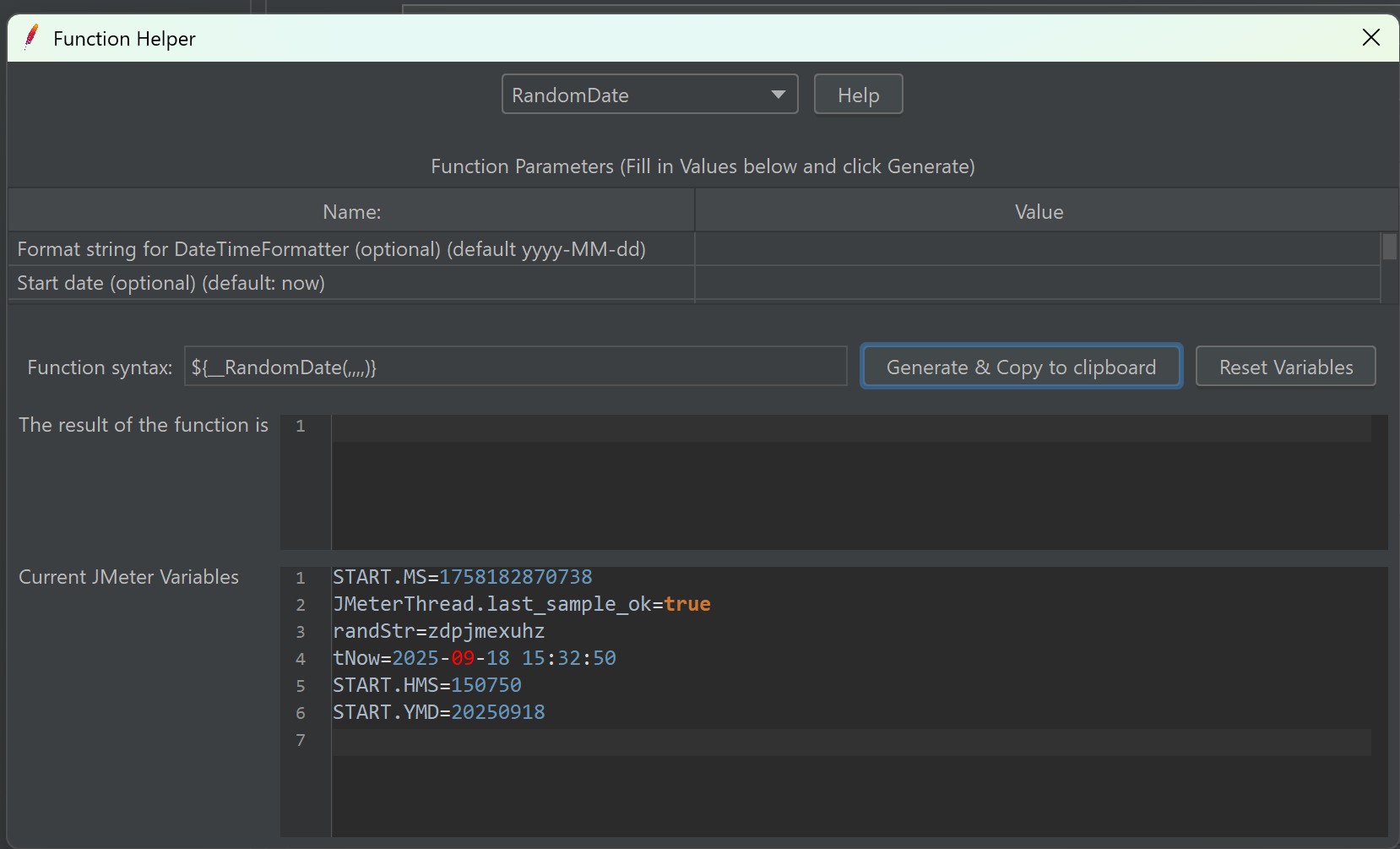
- Cú pháp: ${__RandomDate(format, startDate, endDate, locale, varName)}
- Cách hoạt động: Trả về ngày ngẫu nhiên nằm giữa startDate và endDate theo format (mặc định yyyy-MM-dd). Kết quả có thể lưu biến. jmeter.apache.org
- Ví dụ: Sinh ngày sinh cho test data, tạo ngẫu nhiên ngày sinh nhật trong khoảng hợp lệ, test form validation với ngày. ${__RandomDate(dd/MM/yyyy,01/01/1980,31/12/2000,,birthDate)} -> ${birthDate} = ví dụ 13/07/1992
2.6 Property Function

- Cú pháp: ${__P(varName,defauldValue)}
- Cách hoạt động: ${__P()} đọc JMeter properties (global cho toàn test). __P() là shorthand hay dùng khi truyền -J từ CLI. Biết rõ: properties khác variables (variables là thread-local). jmeter.apache.org+1
- Ví dụ: Trong TestPlan bạn cấu hình
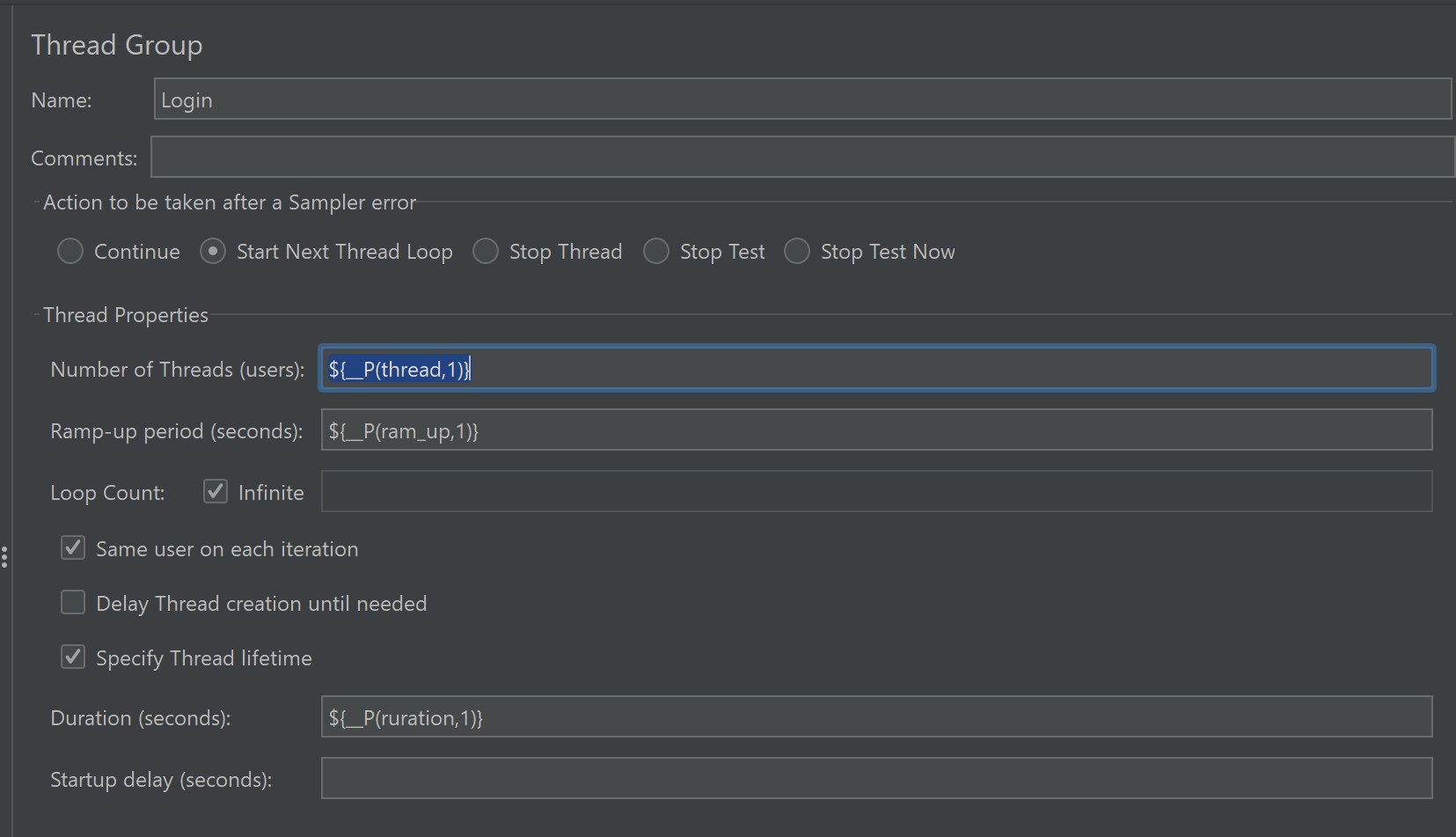
- Khi chạy non-GUI cần thay đổi thông tin thay vì bạn phải mở testplan ra và thay đổi thì có thể truyền trực tiếp: jmeter -n -t testplan.jmx -Jthread=10 -Jram_up=10 -Jduration=300 -l results.jtl -e -o htmlreport
- Dùng để tham số hóa bất kì biến nào
2.7 Counter (Bộ đếm)
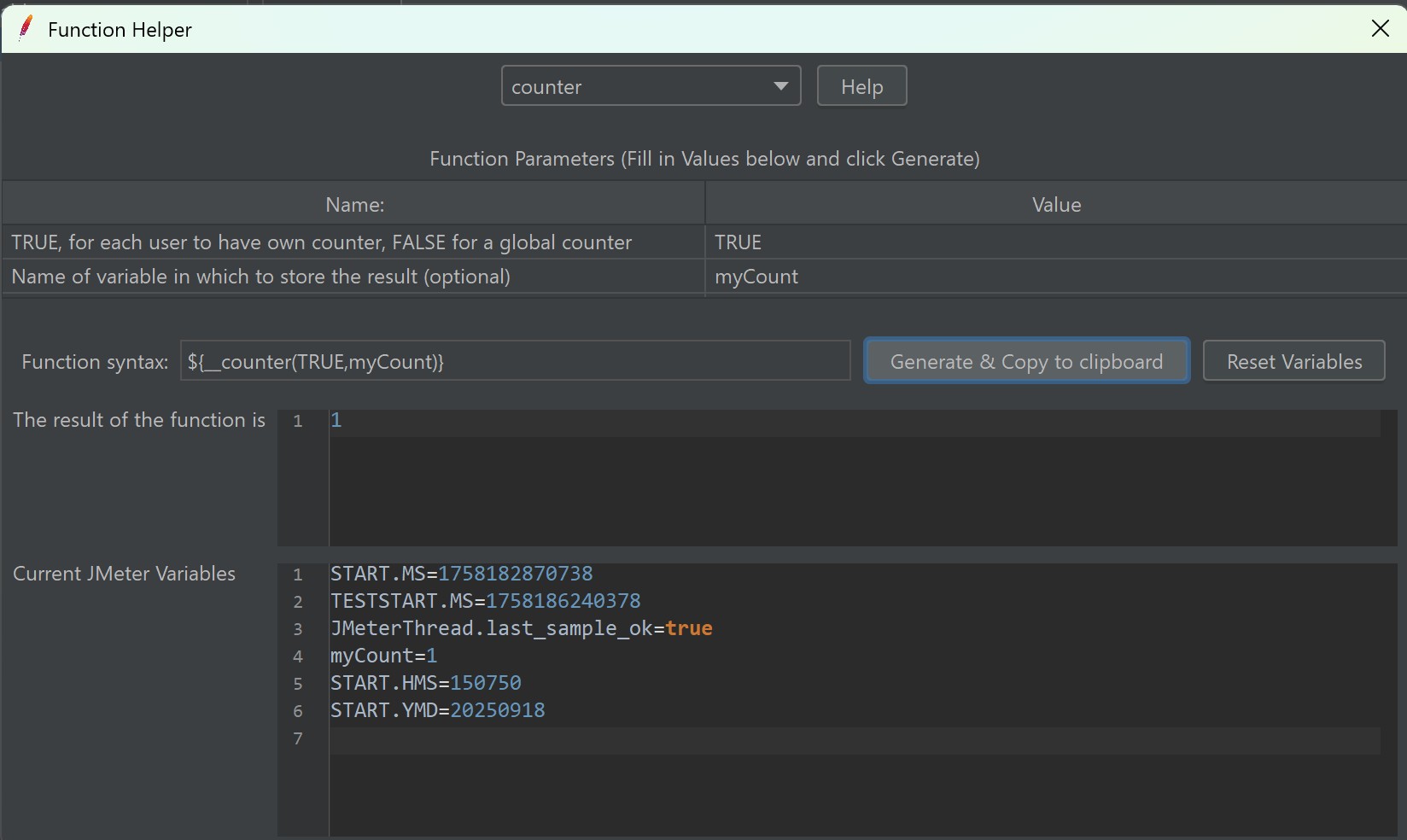
- Cú pháp: ${__counter(booleanPerUser, varName)}
- Cách hoạt động: booleanPerUser=true → mỗi thread có counter riêng (đếm số vòng/iteration của thread đó). booleanPerUser=false → counter chung (global) cho tất cả threads. Kết quả được trả về và có thể lưu vào biến. blazemeter.com
- Ví dụ:
${__counter(TRUE,myCounter)} -> mỗi thread có myCounter = 1,2,3...
${__counter(FALSE,globalCnt)} -> shared counter giữa các thread
Tạo sequence number cho orderId (global) hoặc đếm iteration cho debug (per-user).
2.8. ThreadNum (Bộ đếm thread)
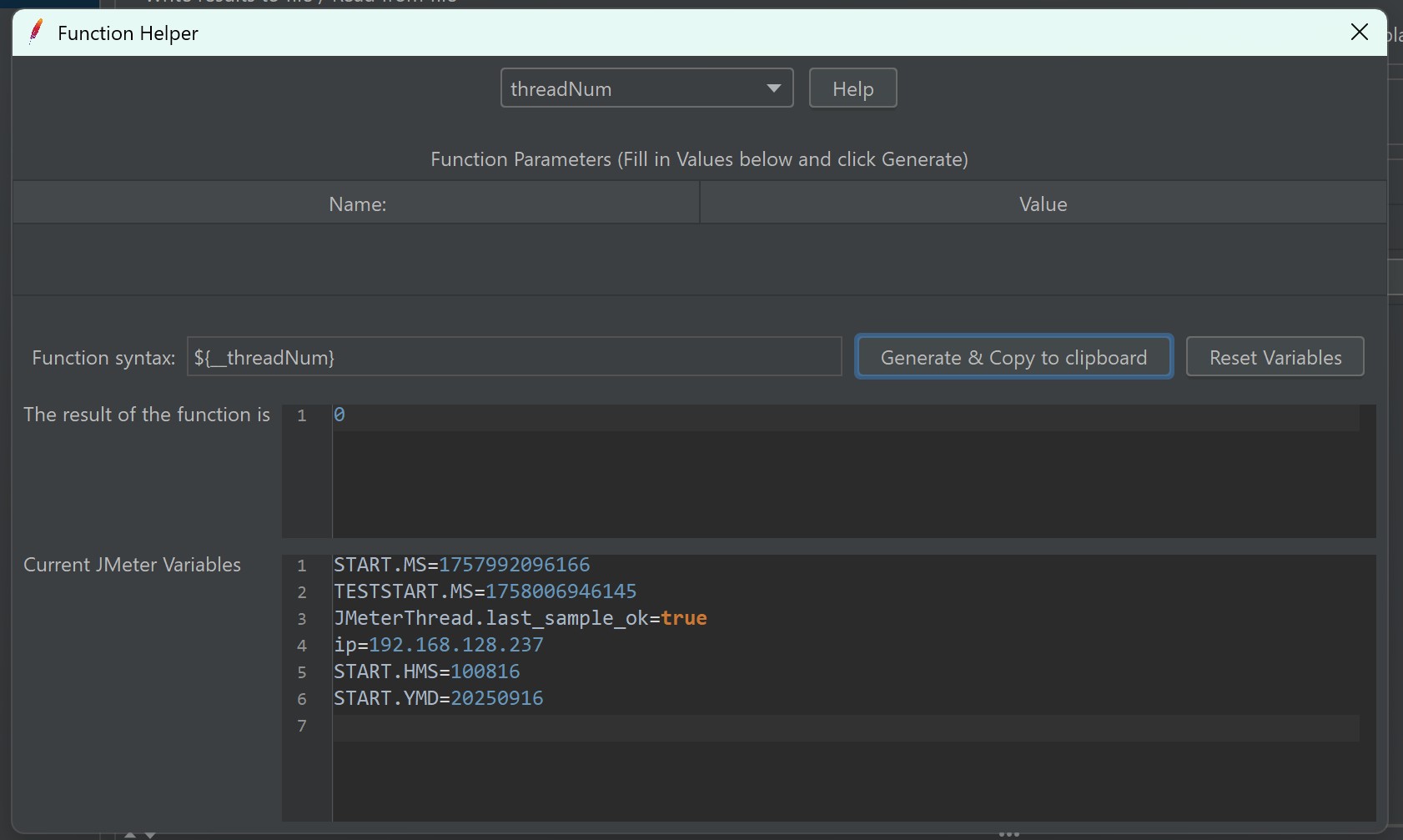
- Cú pháp: ${__threadNum}
- Cách hoạt động: ${__threadNum} trả số thứ tự thread hiện tại (từ 1 .. N). Chỉ unique trong scope thread group (không đảm bảo global uniqueness). ${__machineName} trả host name của máy đang chạy (hữu ích khi chạy distributed). jmeter.apache.org+1
- Ví dụ: Trong các hệ thống lớn thì việc cấu hình distributed(Kết hợp nhiều máy sẽ tìm hiểu ở bài sau). Để biết request này xuất phát từ máy nào thì chúng ta có thể sử dụng ${__machineName}:${__threadNum} vào một số trường trong api để đánh dấu.
{"name": "iPhone 15 Pro","description": "${__machineName}:${__threadNum}","price": 25000000.00,"merchant_id": 1,"is_deleted": false}
2.9 Mã hóa/Hash (plugin)
2.9.1 MD5
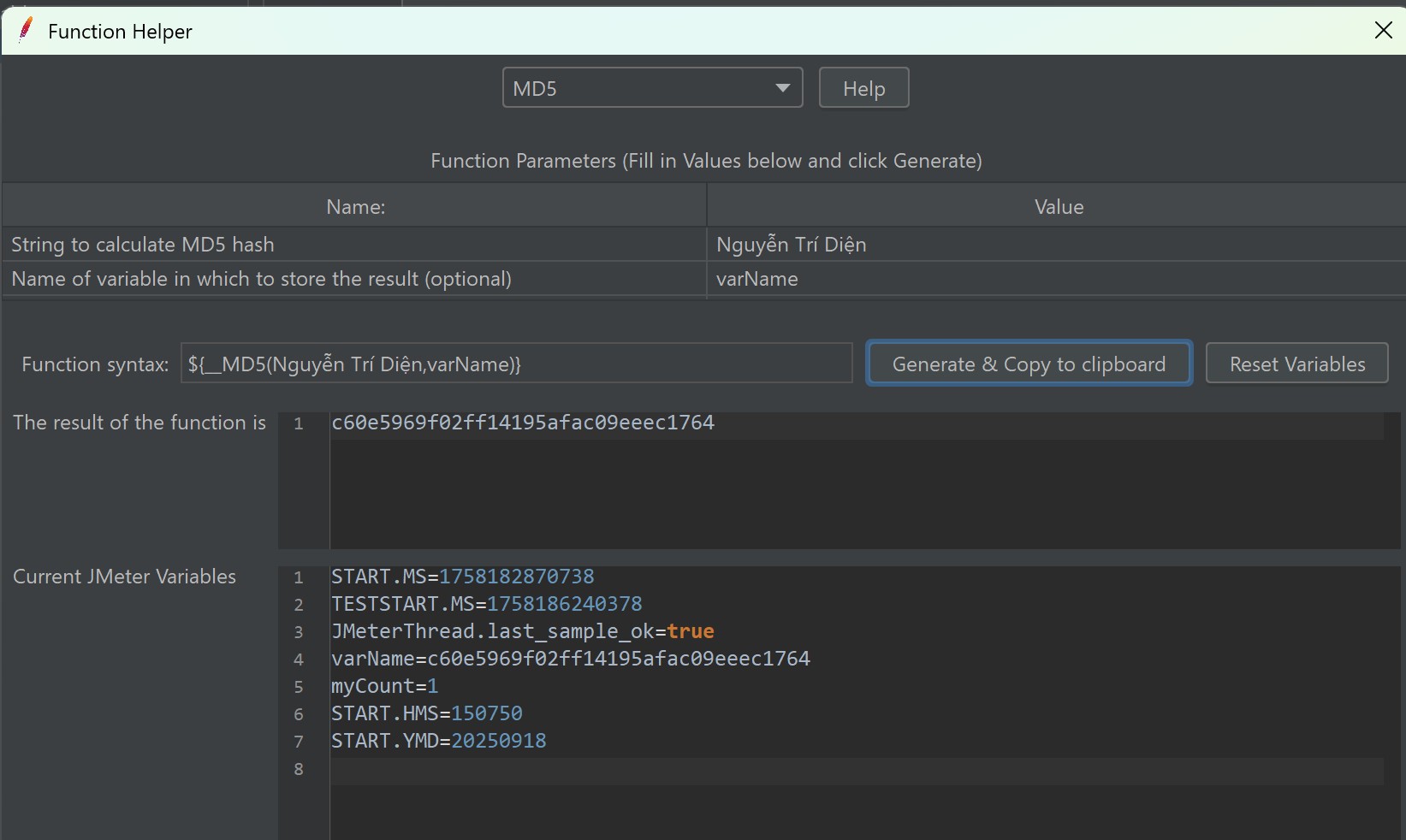
- Cú pháp: ${__MD5(String,varName)}
- Cách hoạt động: Hàm
__MD5sẽ nhận một chuỗi đầu vào và trả về chuỗi băm (hash) theo thuật toán MD5 (32 ký tự hex). - Ví dụ: Sinh mã hash cho mật khẩu trước khi gửi request. So sánh chữ ký (signature) với hệ thống backend. ${__MD5(${username},hashedUser)} 👉 Biến
${hashedUser}sẽ chứa MD5 hash của giá trị${username}.
2.9.2 Base64Encode
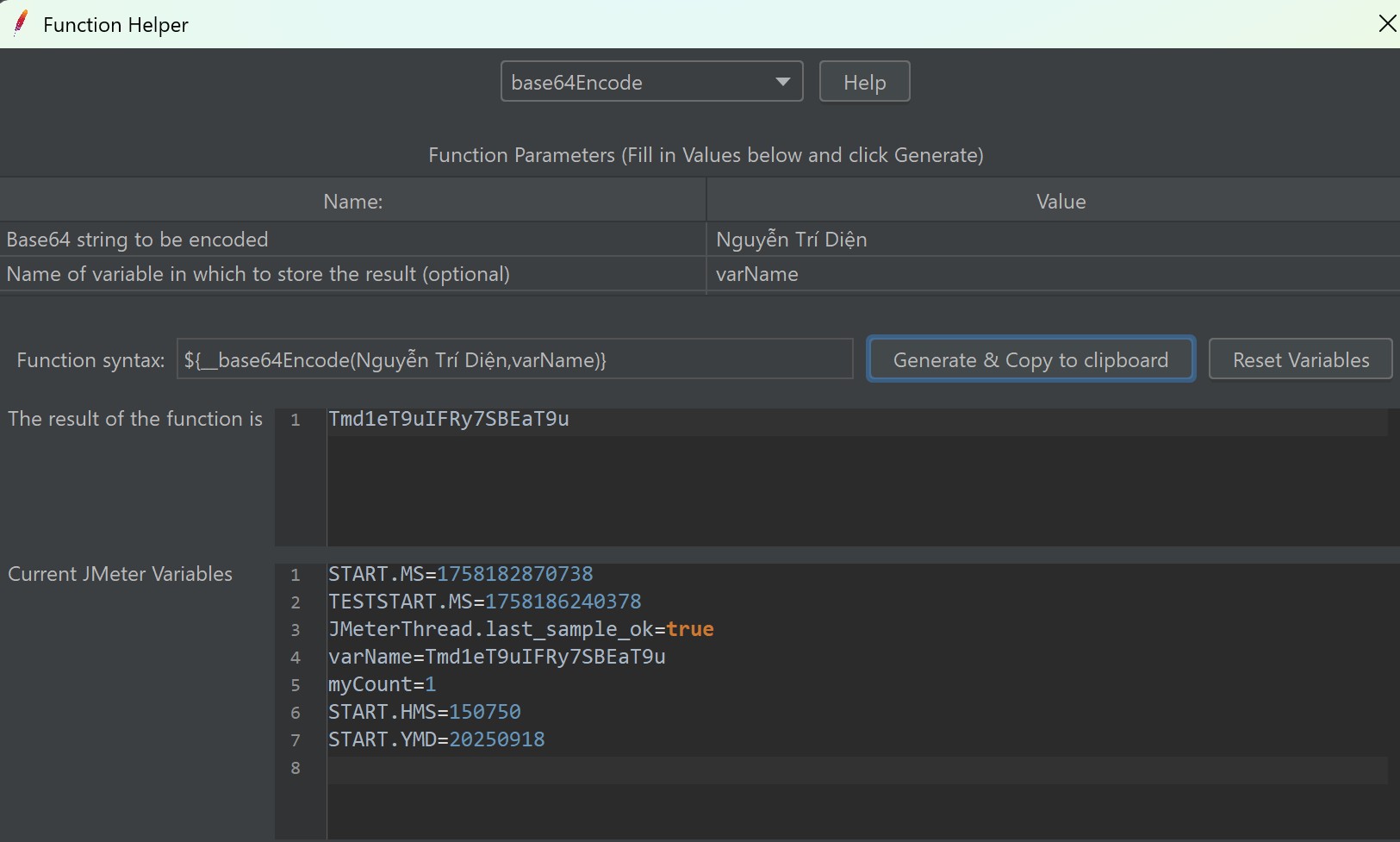
- Cú pháp: ${__base64Encode(string,varName)}
- Cách hoạt động: Mã hóa (encode) chuỗi ký tự sang Base64.
- Thường dùng để:
-
Encode dữ liệu nhị phân (binary) thành chuỗi text (ví dụ: file, ảnh).
-
Tạo Basic Authorization ${__base64Encode(${clientId}:${clientSecret},authB64)}
👉 header: Authorization: Basic ${authB64}
-
Encode chuỗi tĩnh:${__base64Encode(hello)} 👉aGVsbG8=
- Encode biến JMeter: Giả sử ${password} = 123456 -> ${__base64Encode(${password})} 👉 MTIzNDU2
-
2.9.3 Base64Decode
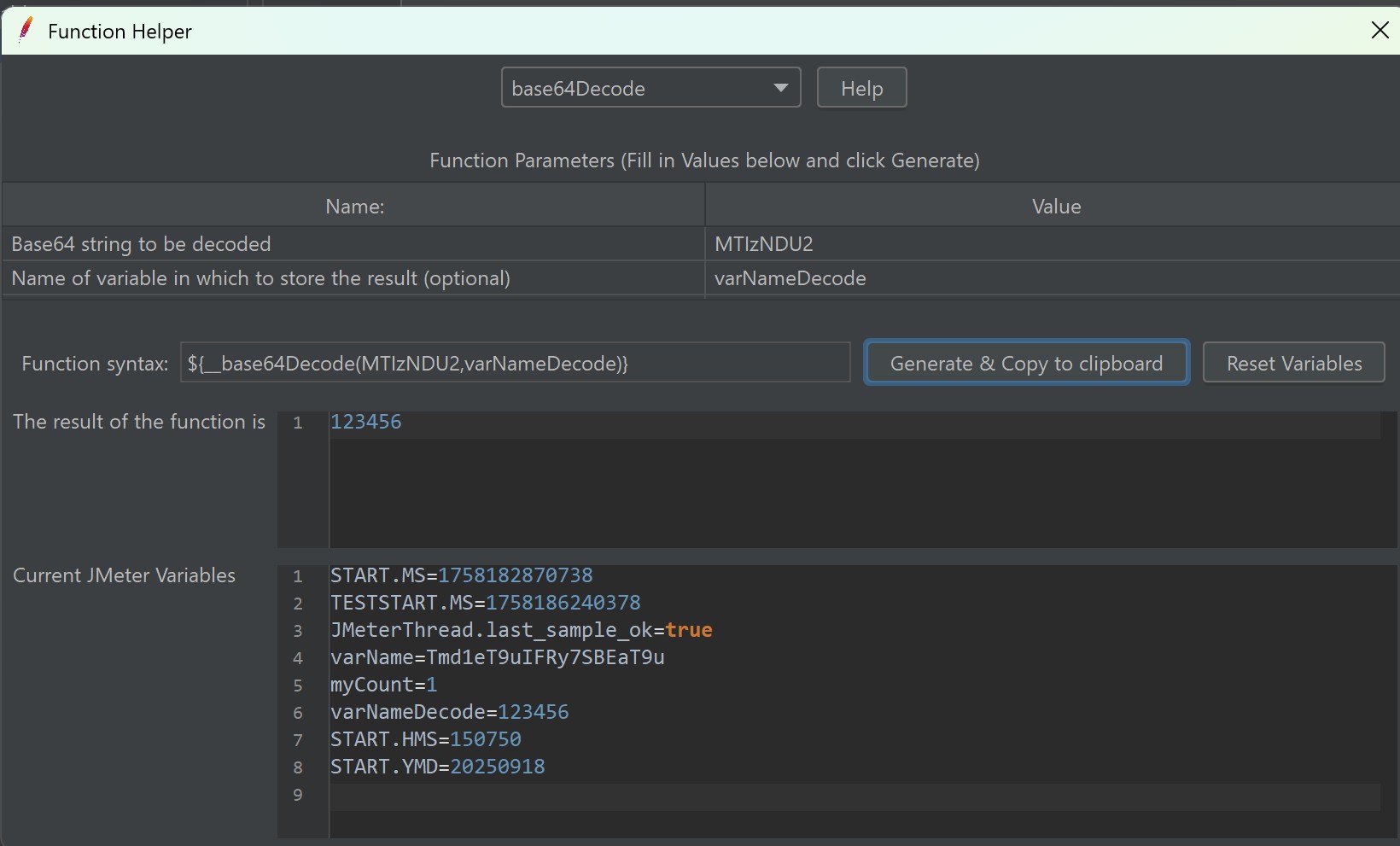
- Cú pháp: ${__base64Decode(string,variableName)}
- Cách hoạt động: Giải mã (decode) một chuỗi Base64 trở lại chuỗi gốc.
- Thường dùng để:
-
Decode chuỗi tĩnh ${__base64Decode(aGVsbG8=)} 👉 hello
-
Decode biến JMeter:Giả sử
${token}=MTIzNDU2-> ${__base64Decode(${token})} 👉123456
-
2.10 Groovy inline
- Cú pháp: ${__groovy(script, varName?)}
- Cách hoạt động: ${__groovy(script, varName?)} chạy Groovy code và trả về giá trị (string). Biến và môi trường nhất định (ví dụ vars, props, log, ctx) có thể truy cập trong JSR223/Groovy; tài liệu JMeter nêu rõ cách và khuyến nghị dùng __groovy cho hiệu năng tốt hơn ở số lượng thread lớn so với __javaScript. svn.apache.org+1
- Ví dụ: Lấy đường dãn thư mục
Mục tiêu
Function
Giá trị trả về (ví dụ)
File .jmx
${__groovy(org.apache.jmeter.services.FileServer.getFileServer().getScriptName(), jmxFile)}
D:/Projects/TestPlan/my_test.jmx
Thư mục chứa .jmx (cấp 1)
${__groovy(org.apache.jmeter.services.FileServer.getFileServer().getBaseDir(), jmxDir)}
D:/Projects/TestPlan
Thư mục cha (cấp 2)
${__groovy(new File(org.apache.jmeter.services.FileServer.getFileServer().getBaseDir()).getParent(), jmxParentDir)}
D:/Projects
Thư mục cha cấp 3
${__groovy(new File(org.apache.jmeter.services.FileServer.getFileServer().getBaseDir()).getParentFile().getParent(), jmxGrandParentDir)}
D:/
3. Tổng hợp ví dụ thực tế(Tổng hợp các function)
Kịch bản: Test flow “Register -> Login -> Create Order” với dữ liệu dynamic:
- Email từ file: ${__StringFromFile(/data/emails.txt,email)}
- Username = user_${__RandomString(5,abcdefghijklmnopqrstuvwxyz,)}
- created_at = ${__time(yyyy-MM-dd'T'HH:mm:ssZ,createdAt)}
- orderId = ${__UUID} hoặc ${__counter(FALSE,globalOrder)}
- Authorization header = Basic ${__base64Encode(${clientId}:${clientSecret},authB64)}
Best practices & tips (các lưu ý quan trọng)
- Dùng đúng tool cho dữ liệu lớn: CSV Data Set Config > StringFromFile/CSVRead cho performance; tránh dùng hàm phức tạp ở mỗi request nếu có thể generate trước. blazemeter.com+1
- Biết rõ scope: variable là thread-local; property là global. Dùng __P() để param hóa khi chạy CLI/CI. jmeter.apache.org
- Plugin functions: cài plugin (Plugin Manager) nếu cần base64/MD5/chooseRandom. Kiểm tra encoding issues khi xử lý tiếng Việt. jmeter-plugins.org+1
- Tránh tính nặng trong function call liên tục: __groovy rất tiện nhưng heavy; cache logic ở JSR223 nếu cần nhiều lần. svn.apache.org
Tài liệu tham khảo (một vài nguồn chính)
- Apache JMeter — Functions and Variables (manual). jmeter.apache.org
- CSVRead API (chi tiết alias / next()). jmeter.apache.org
- StringFromFile / StringToFile API. jmeter.apache.org+1
- JMeter-Plugins — functions (chooseRandom, base64, MD5, ...). jmeter-plugins.org+1
- timeShift / RandomDate docs & ví dụ. jmeter.apache.org+1
- Groovy function in JMeter (with examples & warnings). svn.apache.org+1
JMeter Functions Cheat Sheet
|
Function |
Công dụng |
Ví dụ |
Kết quả (minh họa) |
|
__Random(min,max,,var) |
Sinh số ngẫu nhiên trong khoảng |
${__Random(1,100,,randNum)} |
42 |
|
__RandomString(len,chars,,var) |
Sinh chuỗi random theo length và charset |
${__RandomString(8,abcdef,,str)} |
cfbedaaf |
|
__UUID |
Sinh UUID |
${__UUID} |
550e8400-e29b-41d4-a716-446655440000 |
|
__counter(TRUE,,var) |
Sinh biến đếm tăng dần |
${__counter(TRUE,,c)} |
1, 2, 3… |
|
__threadNum |
Số thứ tự thread hiện tại |
${__threadNum} |
5 |
|
__time(format,,var) |
Thời gian hiện tại với format |
${__time(yyyy-MM-dd HH:mm:ss,,now)} |
2025-09-16 14:30:10 |
|
__timeShift(format,baseDate,shift,,var) |
Thời gian dịch chuyển |
${__timeShift(dd/MM/yyyy,,P1D,,tomorrow)} |
17/09/2025 |
|
__StringFromFile(file,,var) |
Lấy random dòng từ file |
${__StringFromFile(data/names.txt,,name)} |
Alice |
|
__CSVRead(file,columnOrNextOrAlias) |
Đọc CSV tuần tự (legacy) |
${__CSVRead(users.csv,0)} |
user01 |
|
__V(varName) |
Tham chiếu biến động |
${__V(user_${n})} |
${user_2} |
|
__property(name) |
Lấy property JMeter |
${__property(user.dir)} |
/home/jmeter |
|
__P(name,default) |
Lấy property với default |
${__P(host,localhost)} |
localhost |
|
__BeanShell(expr) |
Thực thi code BeanShell |
${__BeanShell(1+2)} |
3 |
|
__groovy(expr) |
Thực thi Groovy (khuyến nghị) |
${__groovy(3*7)} |
21 |
|
__javaScript(expr) |
Thực thi JS |
${__javaScript(Math.floor(Math.random()*10))} |
7 |
|
__digest(MD5|SHA|SHA-256,string,,var) |
Hash chuỗi |
${__digest(SHA-256,hello,,h)} |
2cf24dba5fb0a... |
|
__escapeHtml(string) |
Encode HTML entities |
${__escapeHtml(<test>)} |
<test> |
|
__unescapeHtml(string) |
Decode HTML entities |
${__unescapeHtml(<test>)} |
<test> |
|
__urlencode(string) |
URL Encode |
${__urlencode(hello world)} |
hello+world |
|
__urldecode(string) |
URL Decode |
${__urldecode(hello+world)} |
hello world |
|
__base64Encode(string) |
Base64 encode |
${__base64Encode(hello)} |
aGVsbG8= |
|
__base64Decode(string) |
Base64 decode |
${__base64Decode(aGVsbG8=)} |
hello |